Know the difference between design and publishing
Create a menu design now; hosted QR publishing is planned
Menu Maker is a mobile menu design app. Its current export screen labels QR Menu as Pro; MenuDock has not launched public menu hosting or persistent QR links.
Planned for MenuDock
A simpler way to keep a menu current
Only the first step is available today. MenuDock has not launched publishing, hosted menu pages, or permanent QR codes.
- 01 · AvailableCreate your menu
Design it with an editable template in the Menu Maker mobile app.
- 02 · PlannedPublish online
Put the approved menu on a public MenuDock page guests can open.
- 03 · PlannedGenerate a QR code
Link a printable code to the public menu page.
- 04 · PlannedUpdate the menu
Replace menu content while keeping the same public link and QR code.
Prepare the menu design in the app
- Choose a template that fits your service, such as a single-page cafe menu or a sectioned dinner menu.
- Replace sample content with the real item names, descriptions, prices, and images.
- Review the full layout at a phone-readable size and check each detail against your current menu.
Menu Maker is a mobile app, not a browser-based QR menu editor. Explore its current capabilities on the menu maker page.
The QR Menu export label is marked Pro
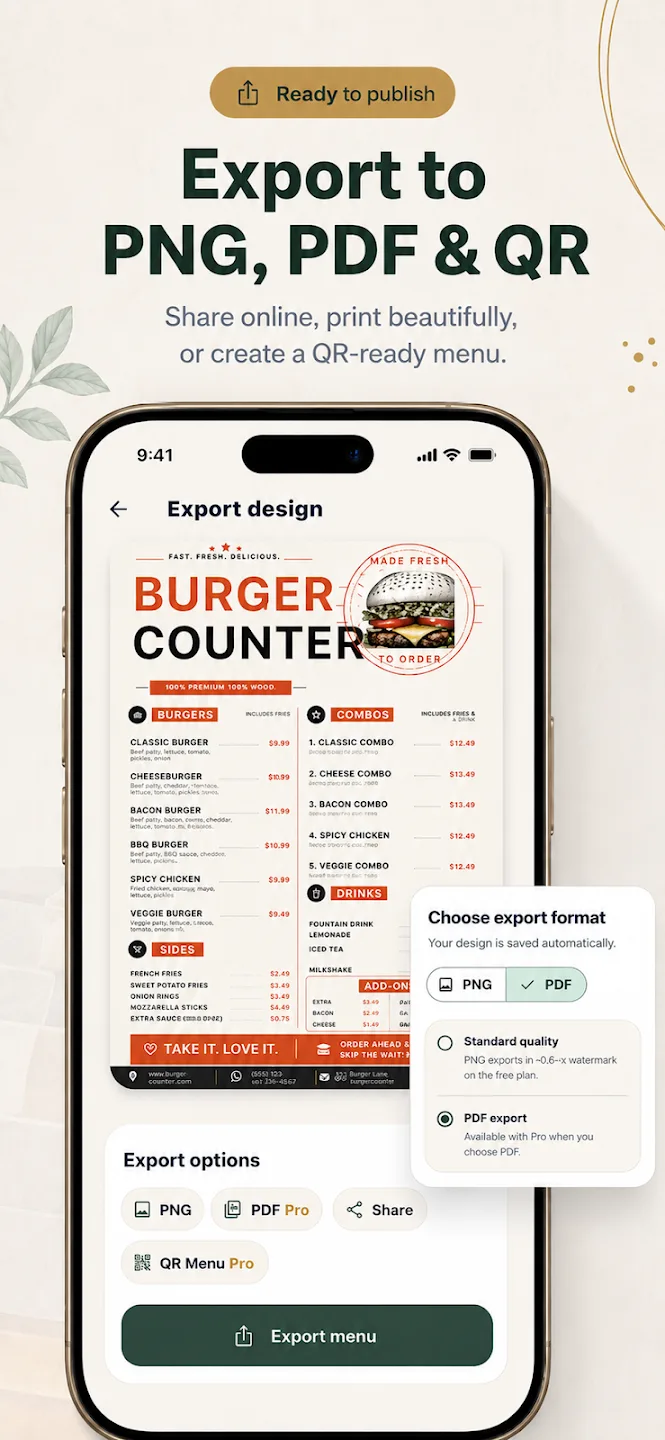
The current Menu Maker export screen shows Standard PNG and options marked Pro, including PDF and QR Menu. This is what the visible export interface supports. It does not establish that a QR code resolves to a permanent MenuDock page.
MenuDock has not launched public menu hosting, a QR generator for hosted menus, or the ability to replace content behind a stable QR destination. Those capabilities are planned.
What a hosted QR menu workflow would do
The planned flow is straightforward: create the menu design in the app, publish it to a public MenuDock page, generate a code that opens that page, then update the page while keeping its address and code the same.
Until publishing is released, an exported menu file and a hosted QR menu are different things. Read about QR menus for restaurants or digital menu formats.
QR menu maker questions
Current app, future hosting
Does Menu Maker include a QR menu feature?
Can I design the menu before publishing it online?
Can I update the menu at the same QR code?
Start creating
Start by designing your menu.
Choose a template and work on it in Menu Maker for iOS or Android.