Start without guessing the limits
A free menu maker, with the limits made clear
Menu Maker is free to download, with in-app purchases. Here is what the current export screen shows for the free plan and what it labels Pro, so you can decide before you start.
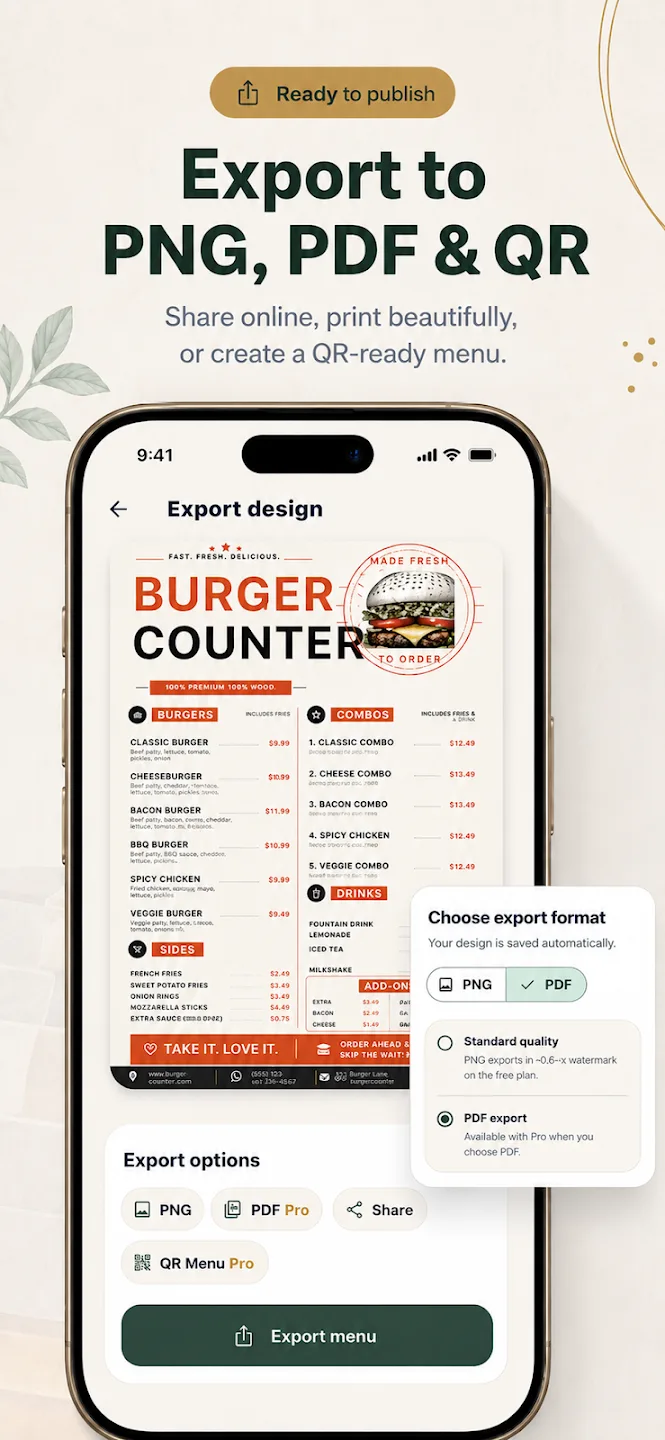
What “free” means in Menu Maker
Menu Maker is free to download from the App Store and Google Play, and both listings show in-app purchases. The current in-app export screen shows a standard-quality PNG option on the free plan. That is a specific free export option, not a promise that every template, tool, or format is included at no cost.
Plan options can change. Check the listing and the purchase details shown in the app before you subscribe.
The export screen marks some formats Pro
- Standard-quality PNG: shown as an export option on the free plan.
- PDF export: marked Pro in the current export screen.
- QR Menu: marked Pro in the current export screen.
This describes the visible export options. It does not promise that every template or editing feature is free. Review the current app purchase screen for the terms that apply to your account.
Try the workflow with your real menu
Before paying for an export format, create a draft with a real section, a long item name, and a current price. Check that the layout works for your content. Then decide whether the free PNG option fits your use or a Pro export is needed.
For a step-by-step overview, visit how Menu Maker works, or browse the available menu template types.
Free plan questions
Know before you download
Is Menu Maker free?
Which exports require Pro?
Are all templates and features free?
Start creating
Check the current plan in the app.
Menu Maker is free to download, with in-app purchases.